Beginners Guide: How to Create a Pinterest Marketing Strategy

Want to create a Pinterest marketing strategy but not sure where to even START? In this blog post, you’ll learn how to START leveraging Pinterest as part of your marketing strategy so that you can drive traffic to your blog and email list. However, I want to ensure you have clear expectations. Pinterest is NOT for you if you are looking for an influx of leads right away, you don’t have the capacity to just take in traffic when it comes, and your website is probably not designed to funnel in traffic. What do you think? If you are ready to learn more, let’s get started.
Pinterest Marketing Strategy: Step One
Write down your 4 content pillars and that includes your products or services, your target audience’s interests, and any subtopics you want to talk about. This is super important so that you can identify keywords. Those keywords will support your Pinterest boards, bio, board descriptions, pin titles, pin descriptions, and graphics. So open up a new spreadsheet and start writing them down. You can also grab the social media planner here since there is a page about Pinterest keywords.
For example, if you are a photographer, your content pillars might be:
- (City) Elopement
- (City) Wedding venues
- Micro-weddings
- Wedding destination photographer
- Chic weddings/whimsical weddings
- Couple photoshoot ideas
- (City) Engagement photographer
Pinterest Marketing Strategy: Step Two
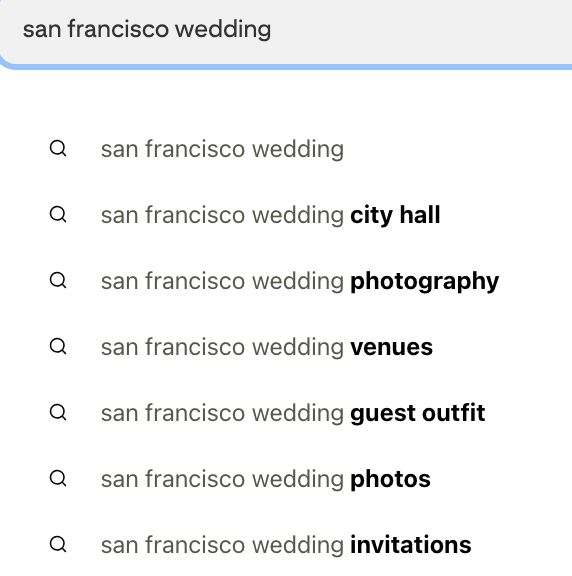
Identify your keywords, and create a list of 100 Pinterest SEO keywords you want to rank for. So, for instance, if your content pillar is “San Francisco Wedding.” Type that into the Pinterest search bar and write all the keywords on your list that pop up underneath “San Francisco wedding.” Repeat this for your next 3 pillars until you have at least 100 keywords written down that you want to be ranked for.

Pinterest Marketing Strategy: Step Three
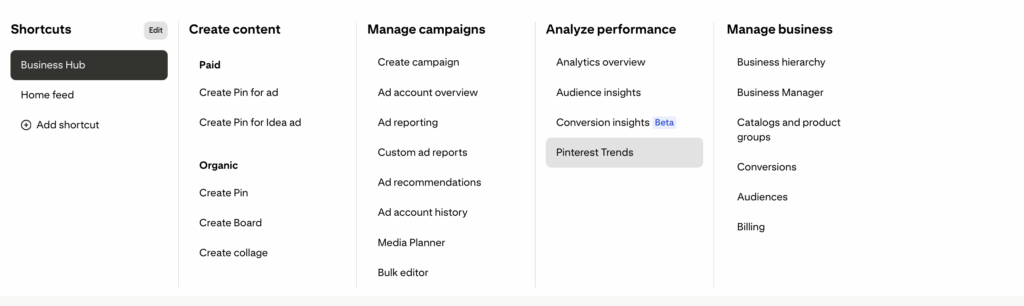
Develop a CONTENT STRATEGY that balances seasonal content, trending keywords, and evergreen content tailored to your niche. For instance, if you are a photographer, there are a lot of seasonal content types that trend on Pinterest, like “Fall photoshoots” or “Summer photoshoots.” NEXT, your content strategy will break down into evergreen content like if people are searching certain keywords like “what to wear on a photo shoot” or ” what to wear for maternity photos.” And don’t forget trending keywords. This is a great way to go viral on Pinterest, so that’s why it’s important to stay ahead of the trends. You find it by clicking Business Hub on the left -> click on Pinterest trends
What to do Weekly
- Create one to two new blog posts a week with your keyword in mind
- Create 5-10 graphics for your blog post and pin each one to five different boards (Make sure to include relevant links, keyword titles, and keyword descriptions)
- Schedule a new pin per a day but never two pins to the same board – You can schedule them for free on Pinterest or use Tailwind scheduler
What to do Monthly
- Identify which boards and pins performed the best
- Was it the keyword, image, or topic that was most relevant?
- Pins usually take three months to gain traction, so keep this in mind when reviewing analytics
- Look to see if any new, trendy keywords are relevant so that you can post about that topic before it blows up online
What to do Quarterly
- Create fresh new pins for past links so your URL’s can continue to drive traffic
- Repeat new URL pins every 10-12 weeks
Read more:
- 5 Insider Tips and Tricks to Learn Pinterest Quickly
- Quick Guide: How to Use Pinterest to Make Money