How to Automate Your Client Onboarding for Service Providers and Coaches with Airtable

Ready to automate your client onboarding with Airtable? Maybe you want to make a great first impression when you onboard a new client (no matter what time of day it is)? Or you might be tired of hunting down information for your clients? Your meeting notes are scattered everywhere, and you don’t know where everything is. Instead, let’s put everything into one platform, AIRTABLE. Keep reading to learn how to do this.
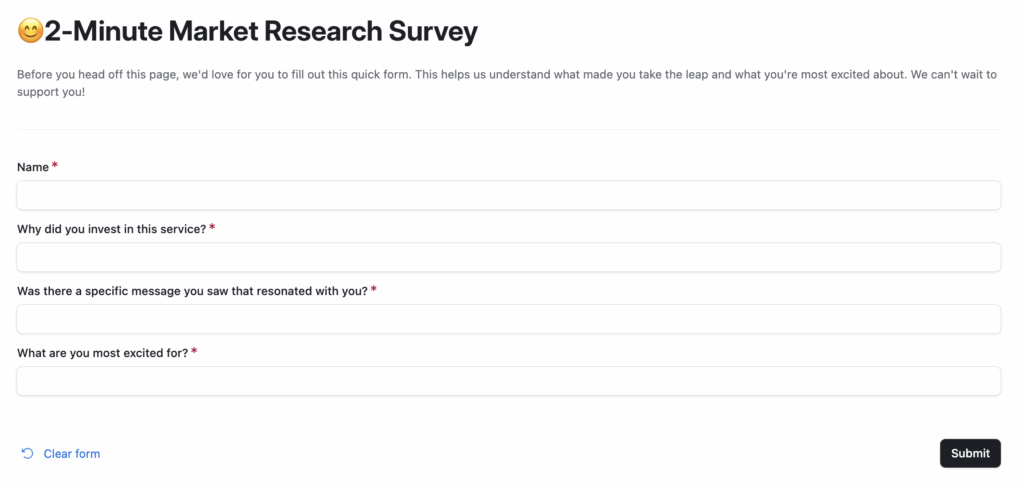
After they pay your invoice, you are going to embed a link that is called “Why did you join?” You can also position it as a 2-minute market research. You see a lot of these kinds of questions when you buy things online. The questions will be:
- Why did you invest in this service/program?
- Was there a specific message you saw that resonated with you?
- What are you most excited for?
THE BEST PART is you can use these results to share on your podcast, email list, or website.
Once they fill this out, you can automate your onboarding process in Airtable, such as sending them a welcome email, agreement forms(contracts), Google folders, ClickUp tasks, etc.
Then, in Airtable, you can create different tables like client notes, onboarding, etc. and then have all your notes in one place.
“Amanda, what if they don’t fill out the link right after purchasing?”
Okay, I hear you.
My best advice is to send another automatic email once they sign up to remind them that they need to fill this form out, and it takes like 2 minutes since it really is only a few questions. And this makes sure they get onboarded. Plus, you can get any key details you need to complete their service or program. You can add this condition into Zapier.
Example Below ⬇️
Want more clarity? Now booking FREE System Clarity Calls. Book your spot here.